
전화를 받는 순간,
고객을 이미 알고
응대합니다Answer every call
already knowing
the customer
BSS IPCC는 교환기·IVR·콜 배분·녹취·AI 상담을 Odoo 안에 담은 콜센터 솔루션입니다. 상담원은 별도 장비 없이 웹 브라우저로 전화를 받고, 연결과 동시에 고객정보가 열립니다.BSS IPCC puts the PBX, IVR, call routing, recording and AI agent inside Odoo. Agents take calls in a web browser — no hardware — and the customer record opens as the call connects.
전화 한 통은 네 단계를 거칩니다Every call goes through four steps
2–4단계는 모두 BSS IPCC 서버가 처리하고, 경로는 Odoo의 PBX 구성도·인입 라우트·IVR 화면에서 바꿔 「설정 적용」으로 반영합니다.Steps 2–4 run on the BSS IPCC server. Change the path in Odoo’s PBX graph, routes and IVR screens, then press Apply.
콜 인입Inbound call
대표번호로 걸려온 전화가 SIP 트렁크를 통해 서버에 도착합니다.A call to your main number arrives at the server over a SIP trunk.
회선 · 번호 인식Trunk & DID match
어느 회선, 어느 착신번호인지 보고 갈 곳을 정합니다.The trunk and dialed number decide where the call goes.
IVRIVR
고객번호를 확인하고 조회 메뉴를 안내합니다 — 녹취도 이때 시작됩니다.Verifies the customer and offers self-service menus; recording starts here.
상담원 / AIAgent / AI
고객정보 팝업과 함께 상담원에게, 또는 AI 상담으로 연결합니다.Connects to an agent with a customer popup — or to the AI agent.
서버 한 대에 콜센터 전체가 들어갑니다The whole contact center on one server
교환기 이벤트는 CTI 어댑터를 거쳐 Odoo로, Odoo의 설정은 다시 교환기로. 외부로는 필요한 웹·SIP·음성 포트만 열고 관리용 포트는 내부 전용으로 둡니다.PBX events flow through the CTI adapter into Odoo, and Odoo’s configuration flows back to the PBX. Only the web, SIP and media ports are exposed; admin ports stay internal.
BSS IPCC Server 서버 한 대Single server
고객을 먼저 확인하고,
다섯 갈래로 안내합니다Identify first,
then five ways to help
보험 콜센터 시나리오로 구현된 IVR 예시입니다. 1–3번 조회는 끝나면 메뉴로 돌아오고, AI 상담은 음성 인식 → AI 답변 → 음성 합성 순서로 처리됩니다.An IVR built for an insurance contact center. Menus 1–3 return to the menu when done; the AI agent runs speech-to-text → AI answer → text-to-speech.
상담원은 연결 순간부터 고객을 알고 받습니다Agents know the customer from the first second
상담원 전화기는 Odoo 화면에 들어 있는 브라우저 전화입니다. 소프트폰(Zoiper 등)으로도 받을 수 있습니다.The agent phone is built into Odoo as a browser phone; softphones such as Zoiper work too.
고객정보 팝업Customer popup
- 고객 기본정보와 VIP 메모Customer profile and VIP notes
- 보유 계약·상담 이력·티켓Contracts, history and tickets
- 이전 통화 녹취 바로 재생Play previous recordings
통화 전환Transfers
- 다른 큐·상담원으로 전환Transfer to another queue or agent
- AI 상담으로 전환 후 필요하면 복귀Hand off to AI and back
- 전환 결과를 미리 안내, 확인 후 실행Preview the transfer before executing
후처리 · AI 메모Wrap-up & AI notes
- 상담 메모와 상담유형별 티켓 접수Notes and categorized tickets
- 대기·휴식 선택 → 다음 콜 배분에 즉시 반영Ready/break instantly affects routing
- AI가 상담 메모 초안 자동 작성AI drafts the call note
상담원 화면Agent workspace
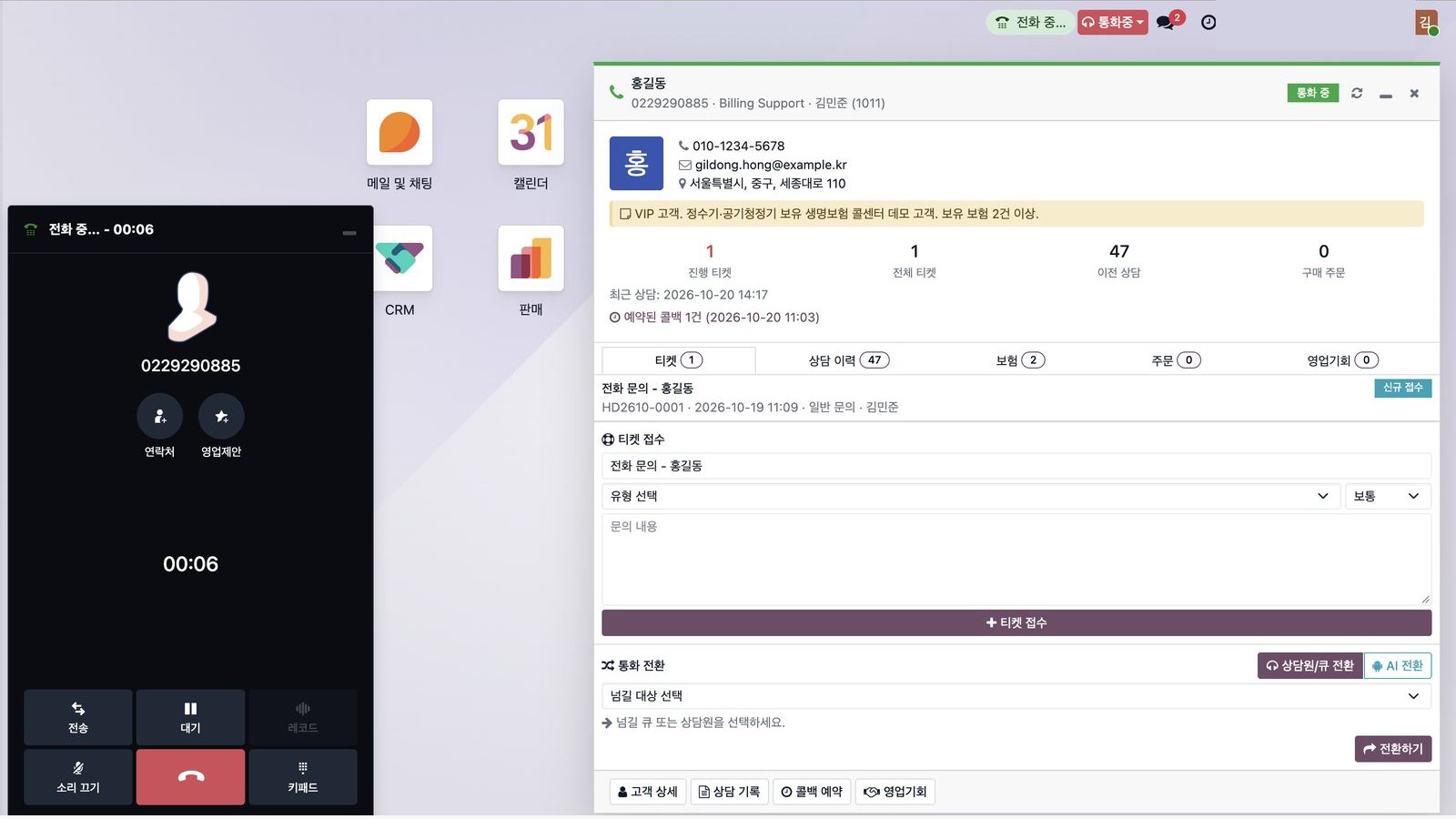
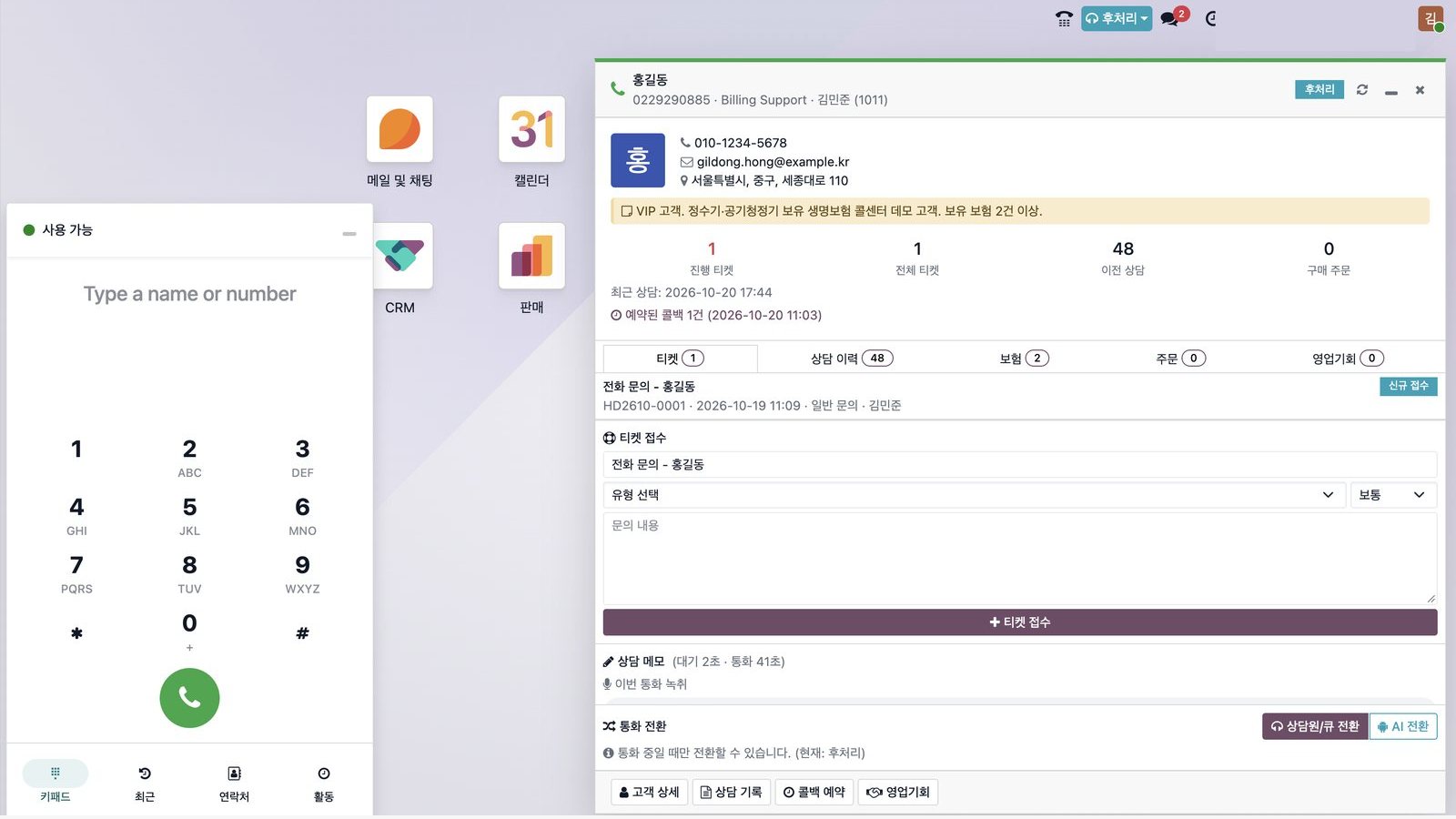
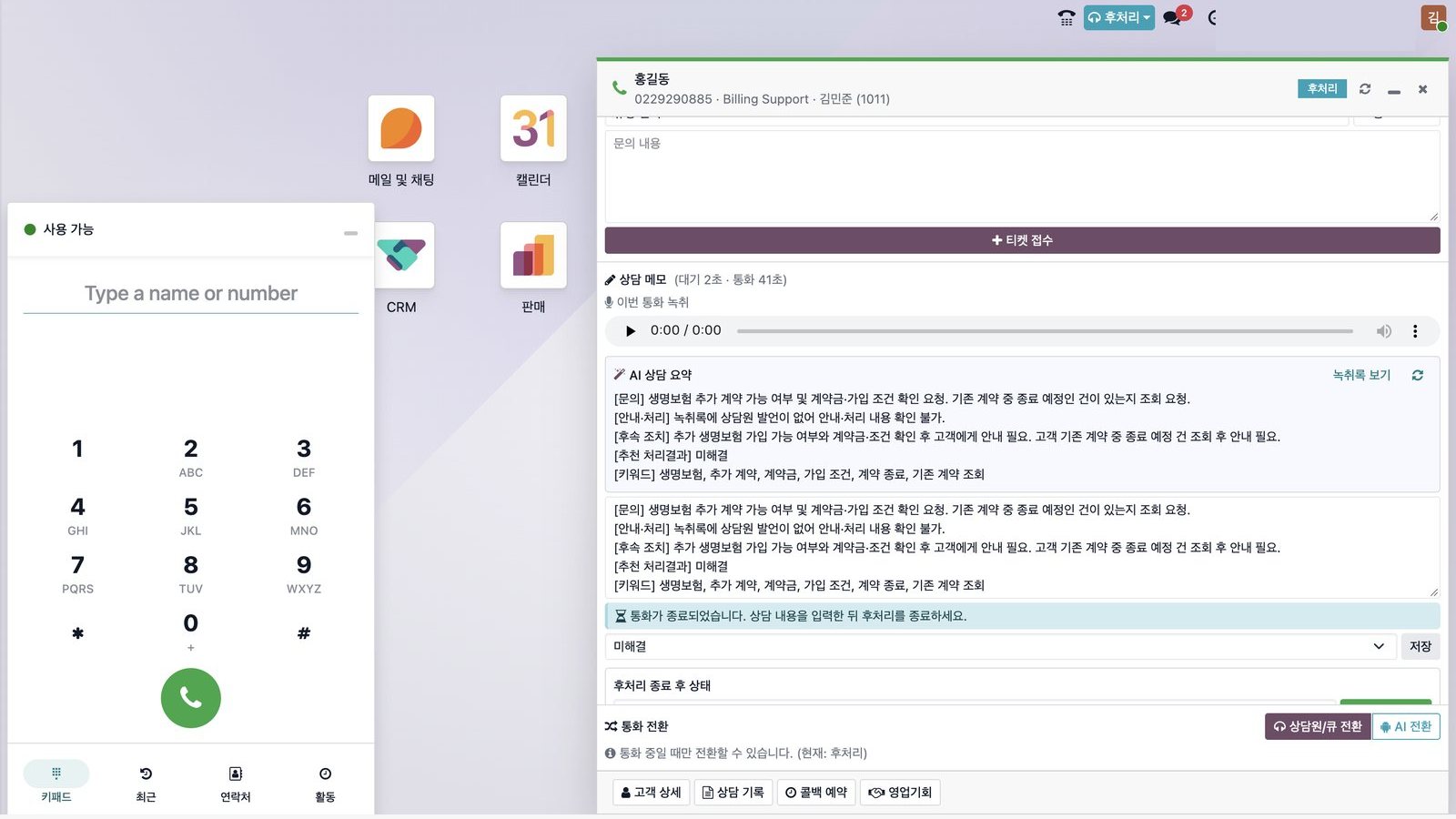 클릭해서 크게 보기Click to enlarge ⤢
통화 중 팝업In-call popup왼쪽은 브라우저 전화기(전송·대기·키패드), 오른쪽은 고객정보·VIP 메모·티켓·상담 이력·보험. 통화 중 상담원·큐·AI 상담으로 전환합니다.Browser phone on the left (transfer, hold, keypad); customer data, VIP notes, tickets, history and policies on the right. Transfer to agents, queues or AI mid-call.후처리After-call work통화가 끝나면 상태가 후처리로 바뀌어 다음 콜이 배분되지 않고, 티켓·상담 메모·처리 결과를 입력한 뒤 대기 또는 휴식을 고릅니다.After the call the agent moves to wrap-up — no new calls are routed until tickets, notes and outcome are saved and the agent picks ready or break.AI 상담 메모AI call summary통화 종료 후 몇 초 안에 AI가 문의·안내·후속 조치를 요약해 상담 메모 초안을 쓰고, 처리 결과를 추천합니다.Seconds after hang-up, AI drafts the call note — inquiry, answer, follow-up — and suggests an outcome.
교환기 설정도, 콜 배분도, IVR도
Odoo 화면에서 끝냅니다PBX, routing and IVR —
all configured in Odoo
PBX 구성도 하나로 관리One PBX graph
노드·회선·인입/발신 라우트·IVR·큐·내선을 탭별로 관리하고 「설정 적용」 한 번으로 교환기에 반영합니다. 초안 → 스테이징 → 운영.Manage nodes, trunks, routes, IVRs, queues and extensions; one “Apply” pushes it to the PBX. Draft → staging → production.
코드 없는 콜 배분 정책No-code routing policy
의도·VIP 조건으로 큐를 정하고, 스킬·가용성·SLA·부하 가중치로 상담원 점수를 계산합니다. 버전 관리.Route by intent and VIP flags; score agents by skill, availability, SLA and load. Versioned.
그려서 만드는 IVRDrag-and-drop IVR
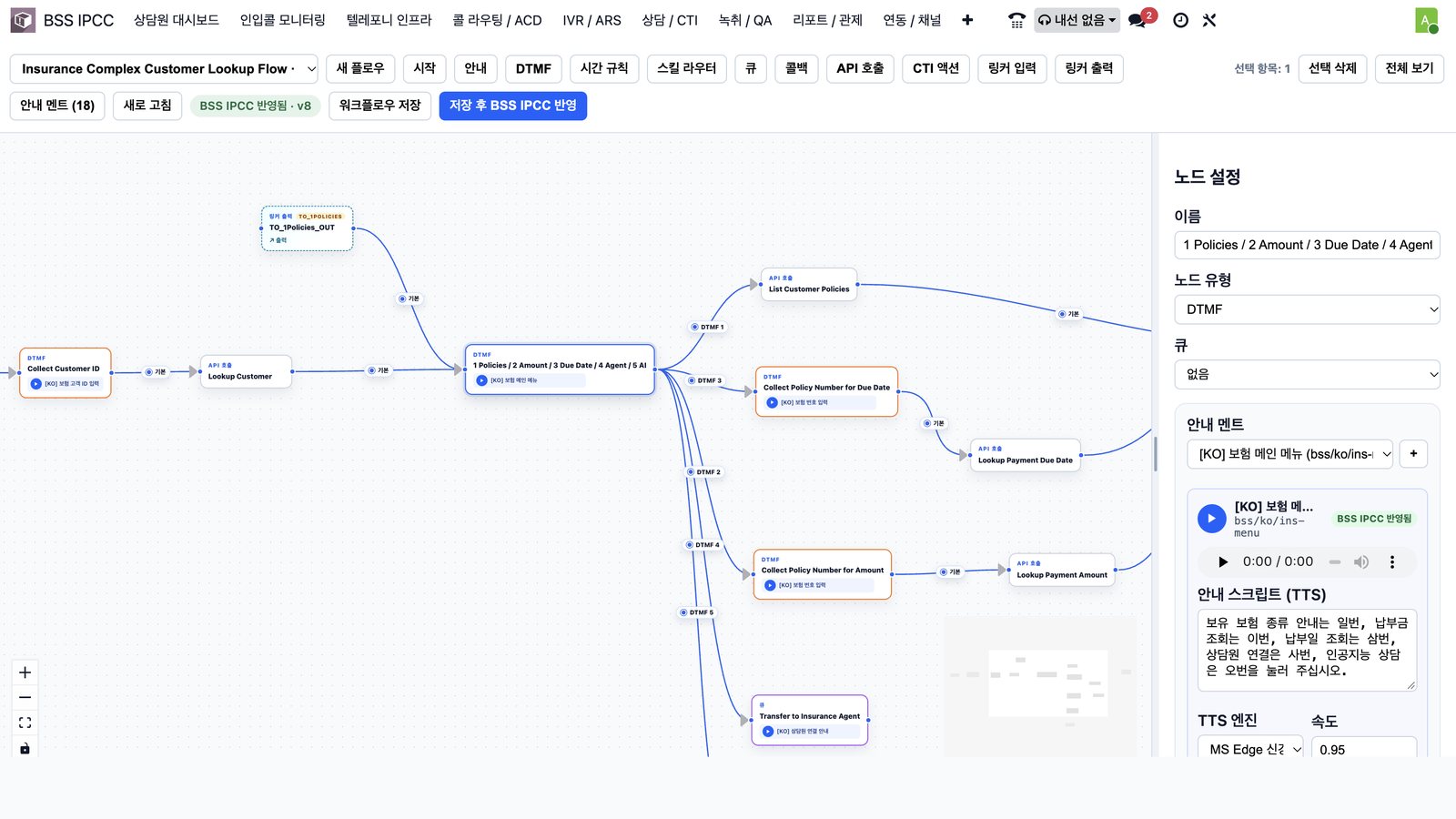
DTMF·API·큐·AI 노드를 연결해 그리고, 배포 전 필수 안내·대체 경로·큐를 자동 점검합니다.Connect DTMF, API, queue and AI nodes; required prompts, fallbacks and queues are checked before deploy.
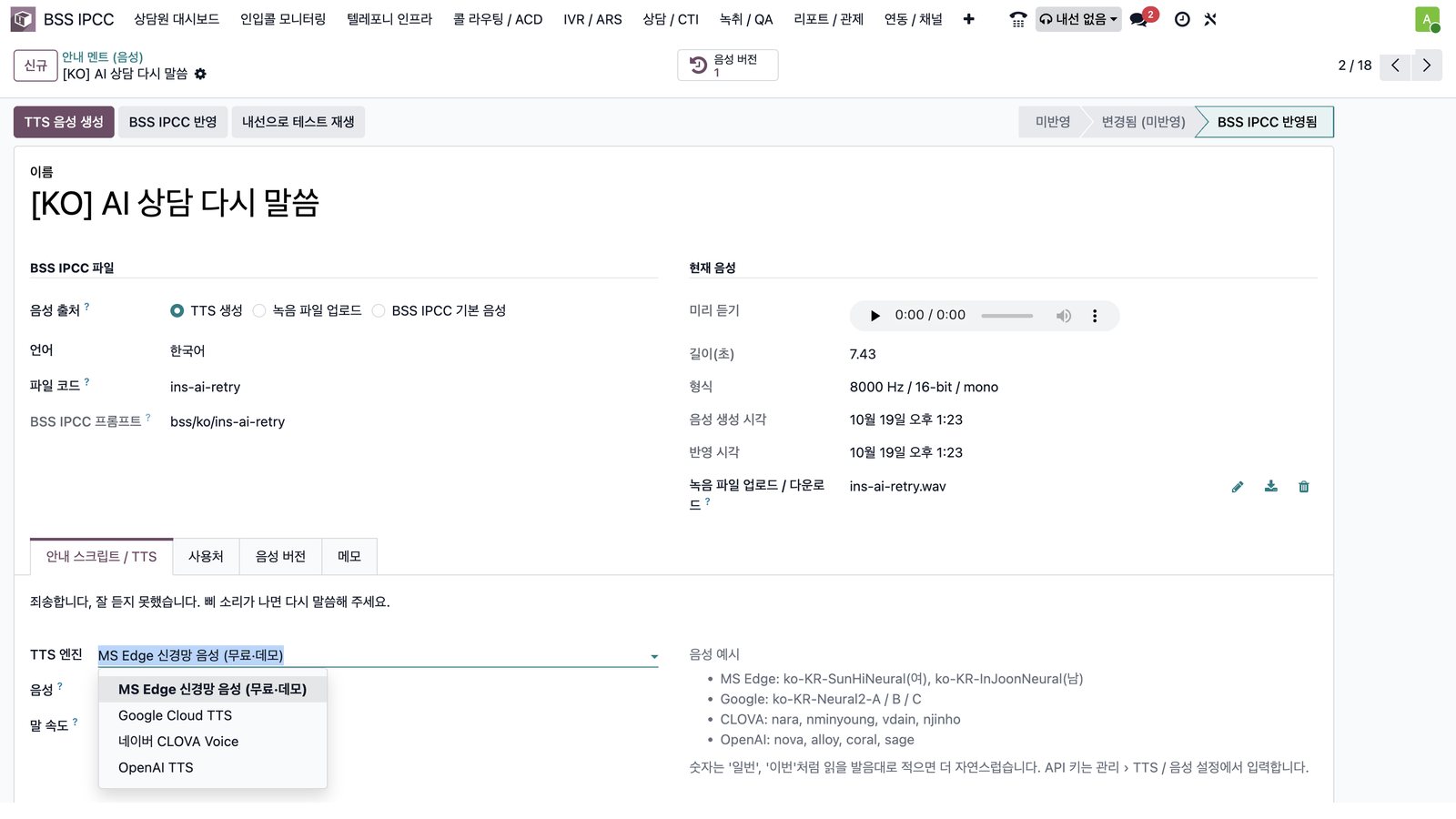
문구만 쓰면 안내 멘트Prompts from text
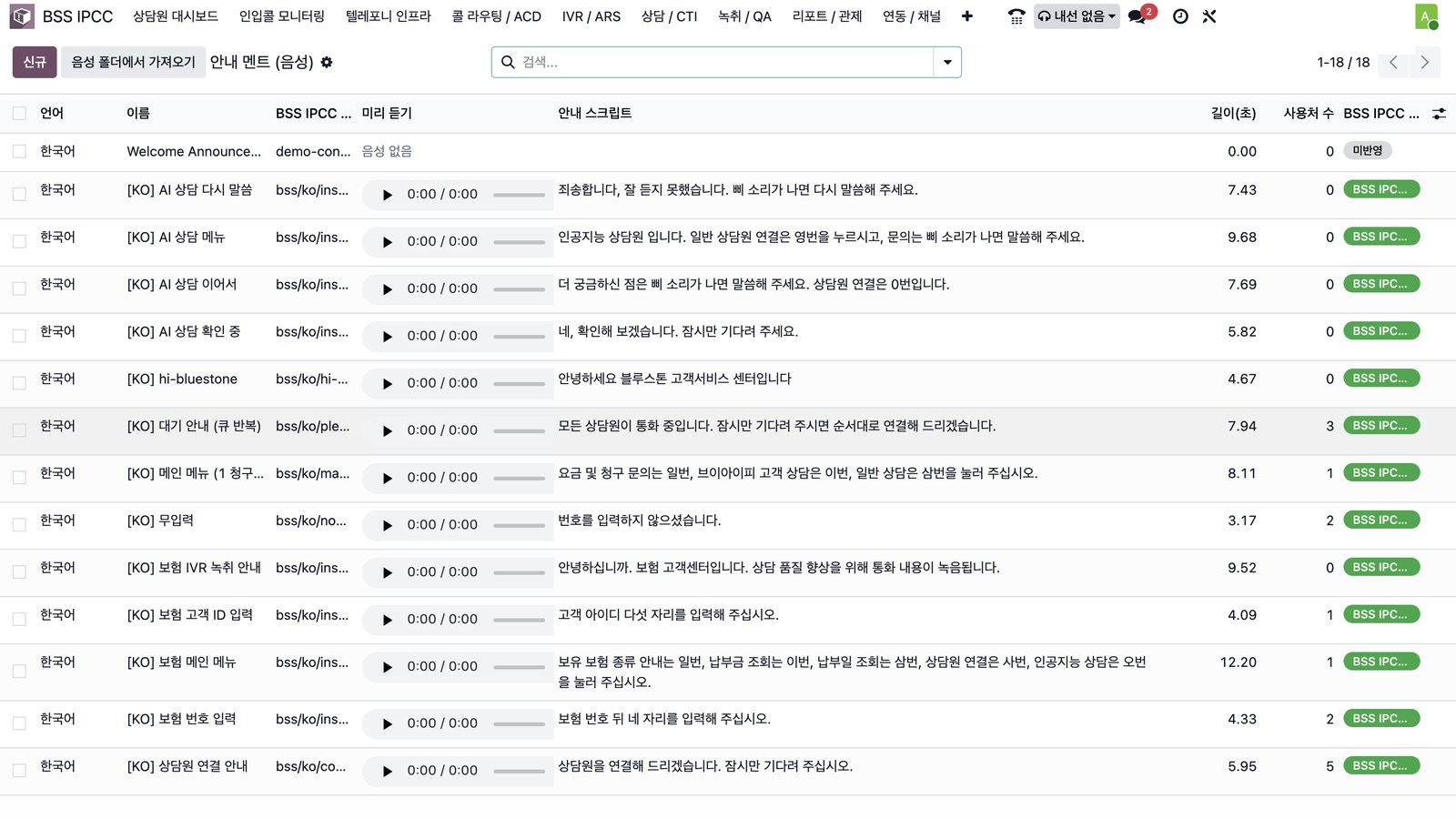
문구 입력 → TTS 음성 생성 → 교환기 반영. 엔진·음성 버전을 기록하고 내선으로 테스트 재생합니다.Text → TTS audio → PBX. Engines and versions are tracked; test-play from an extension.
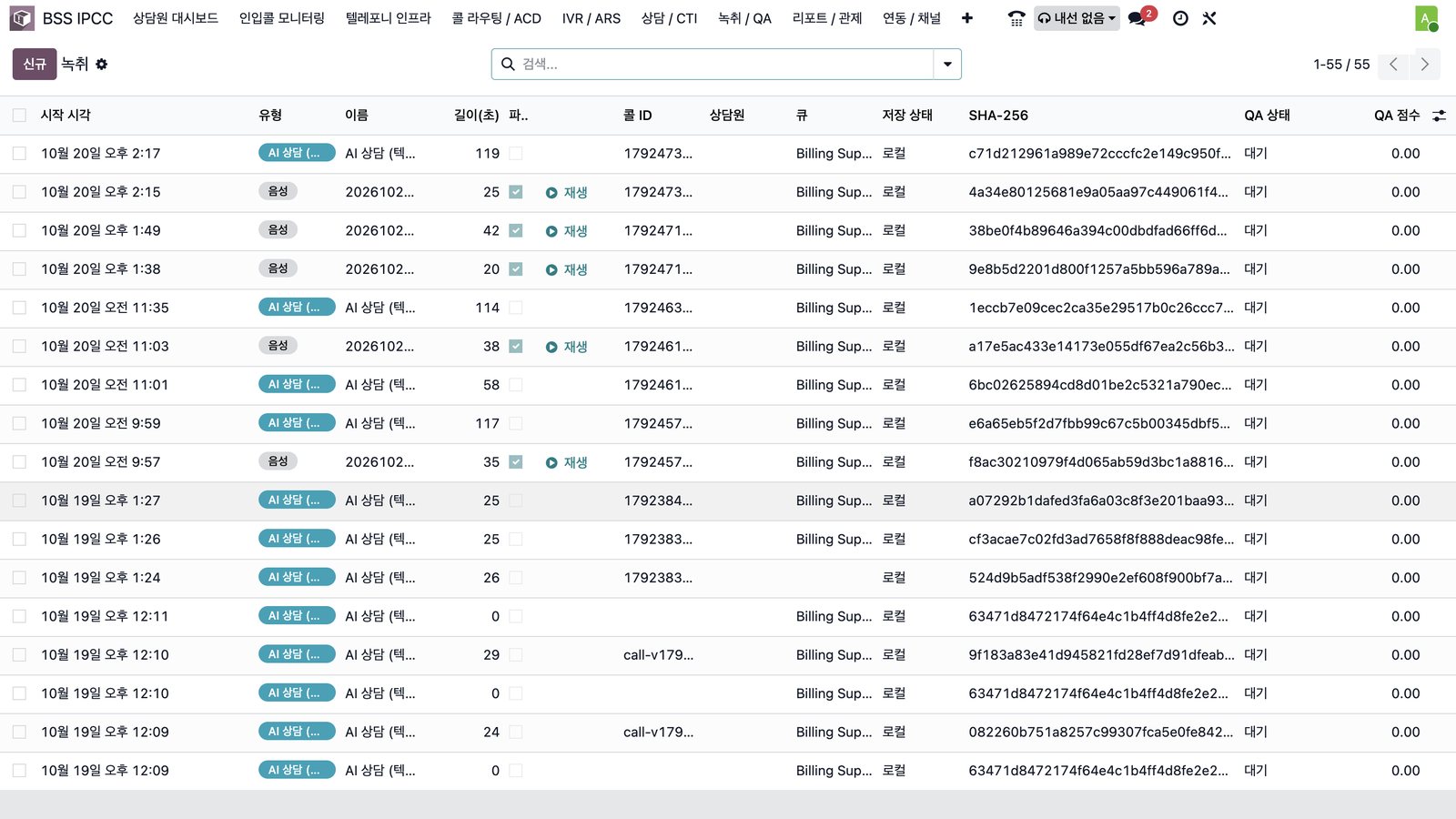
위·변조 확인되는 녹취Tamper-evident recordings
녹취마다 SHA-256 값을 저장하고, QA 상태·점수와 함께 목록에서 바로 재생합니다.Every recording stores a SHA-256 hash, playable from the list with QA status and score.
교환기 · 콜 배분 · IVR 설정PBX, routing & IVR configuration
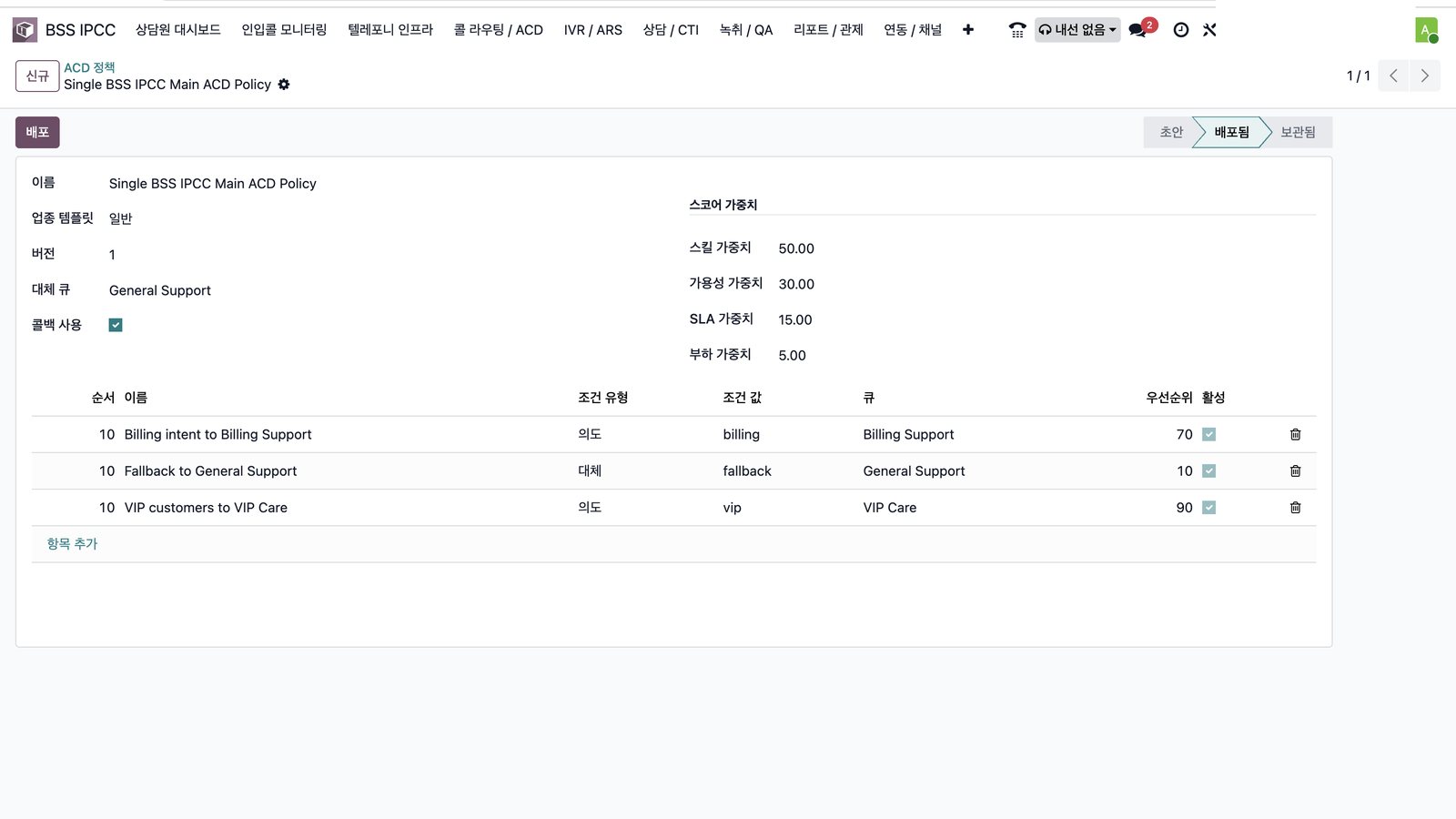
 클릭해서 크게 보기Click to enlarge ⤢
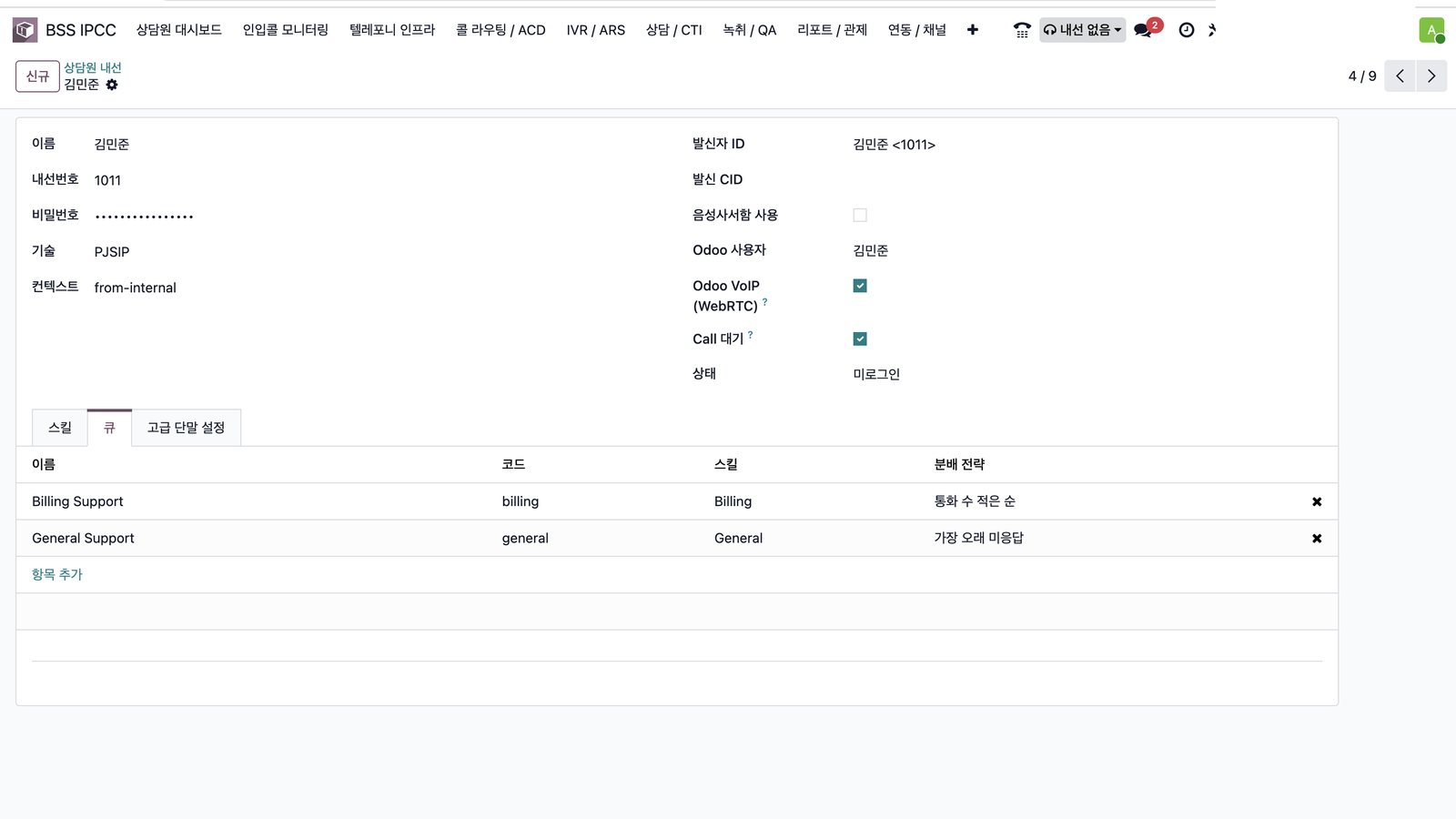
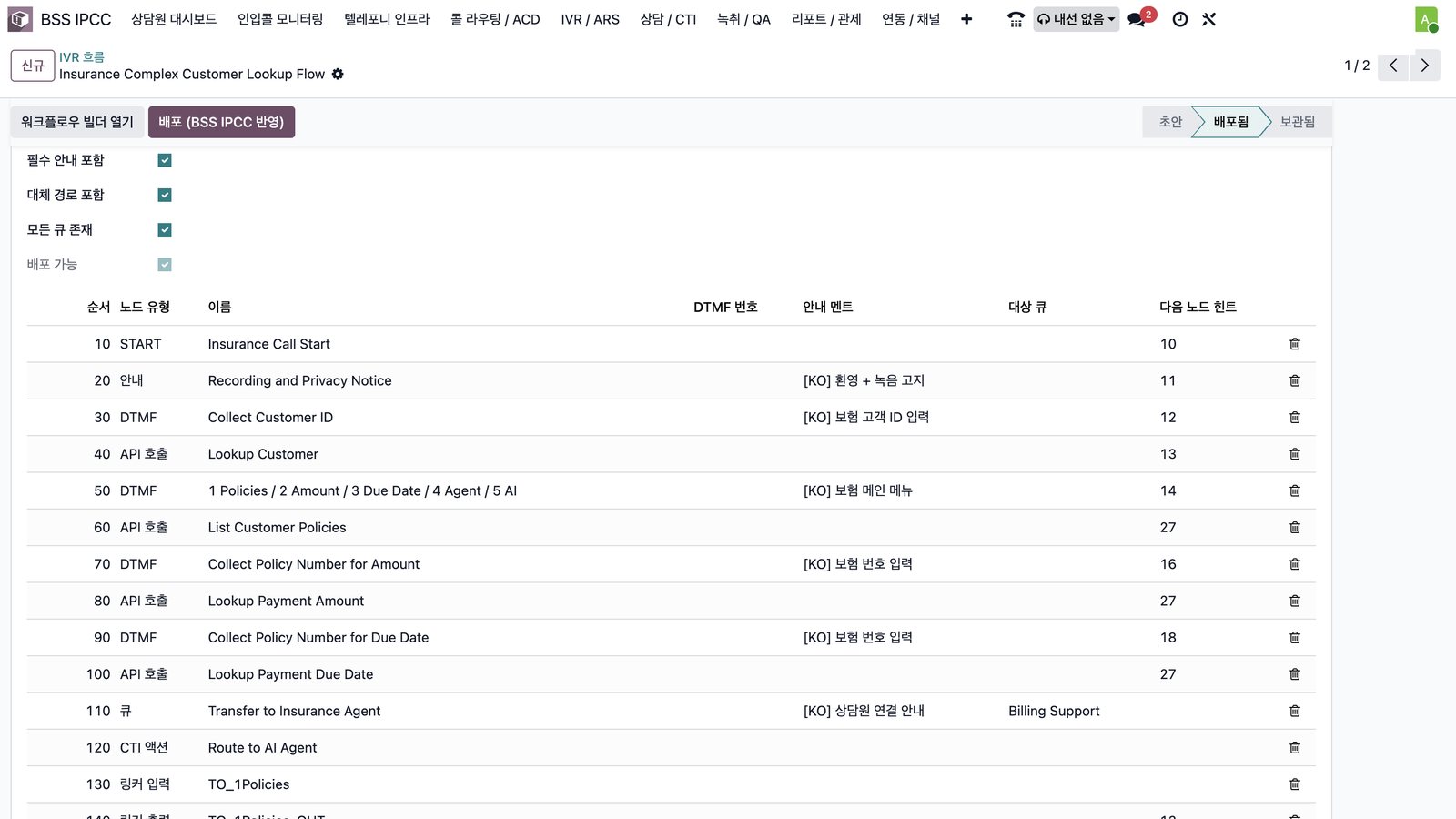
콜 배분 정책Routing policy청구 → Billing, VIP → VIP Care, 그 외 → General. 스킬·가용성·SLA·부하 가중치로 상담원 점수를 계산하고 버전으로 관리합니다.Billing → Billing, VIP → VIP Care, others → General. Agents are scored by skill, availability, SLA and load weights, with versioning.내선 · 큐Extensions & queues내선을 Odoo 사용자와 연결하고 브라우저 전화(WebRTC) 사용, 콜 대기 여부, 소속 큐와 분배 전략을 정합니다.Link extensions to Odoo users, enable the browser phone (WebRTC), call availability, queues and distribution strategy.IVR 디자이너IVR designerDTMF·API 호출·큐·AI 상담 노드를 연결해 그리고, 노드마다 안내 멘트를 미리 듣고 「저장 후 반영」으로 즉시 적용합니다.Draw flows with DTMF, API, queue and AI nodes, preview prompts per node and publish instantly.IVR 노드 목록IVR node list필수 안내·대체 경로·큐 존재를 점검한 뒤 배포합니다.Checks required prompts, fallbacks and queues before deployment.안내 멘트Voice prompts문구만 입력하면 TTS 음성이 만들어져 교환기에 반영되고, 멘트별 사용처와 반영 상태를 보여줍니다.Type the text and a TTS prompt is generated and pushed to the PBX, with usage and status per prompt.음성 엔진Voice enginesTTS 생성·녹음 업로드·기본 음성 중 선택하고, MS Edge·Google·네이버 CLOVA·OpenAI 엔진과 음성 버전을 관리합니다.Choose TTS, uploaded recordings or defaults; manage MS Edge, Google, NAVER CLOVA and OpenAI voices with versions.
모든 통화가 녹취와 상담 이력으로 남습니다Every call becomes a recording and a record
응대 결과(상담원 응대 / AI 응대 / 미연결), 대기·통화 시간, 처리 결과, 상담 메모, 녹취가 CRM의 고객 이력과 연결되어 콜 통계로 이어집니다.Outcome (agent / AI / missed), wait and talk time, result, notes and recordings link to the customer in CRM and roll up into call statistics.
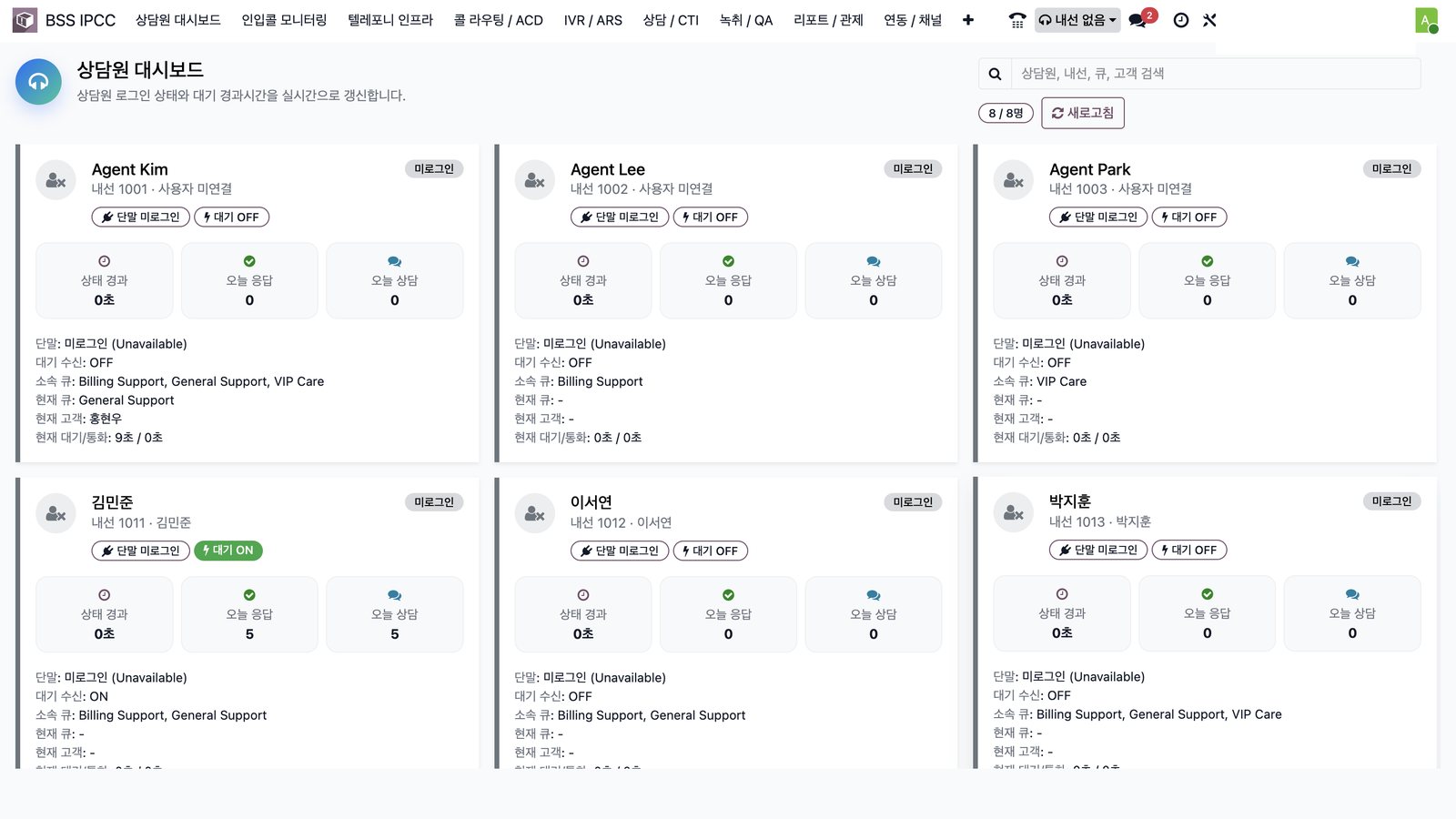
실시간 상담원 관제Live agent monitoring
단말 로그인, 대기 상태, 소속 큐, 오늘 응답 건수와 현재 통화를 한 화면에서.Device login, ready state, queues, today’s calls and current call on one screen.
녹취 · QARecording & QA
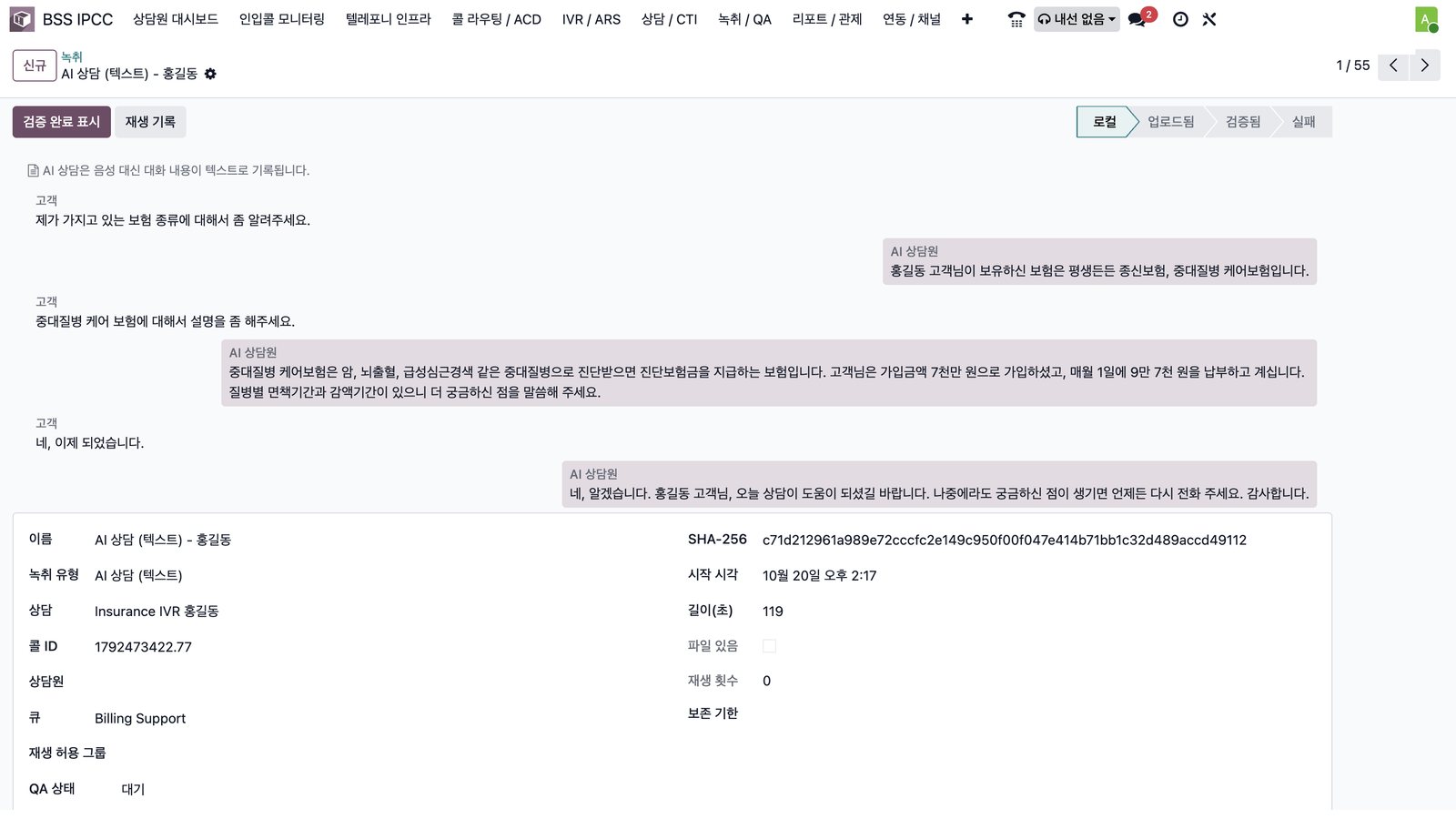
음성 녹취와 AI 대화 기록, SHA-256 무결성 값, QA 상태·점수 관리.Audio recordings and AI transcripts, SHA-256 integrity, QA status and scoring.
CRM · 헬프데스크 연결CRM & helpdesk
최근 상담 메모(AI 요약), 진행 티켓, 영업기회까지 고객 단위로 확인.AI-summarized notes, open tickets and opportunities per customer.
관제 · 녹취 · 상담 이력Monitoring, recordings & history
 클릭해서 크게 보기Click to enlarge ⤢
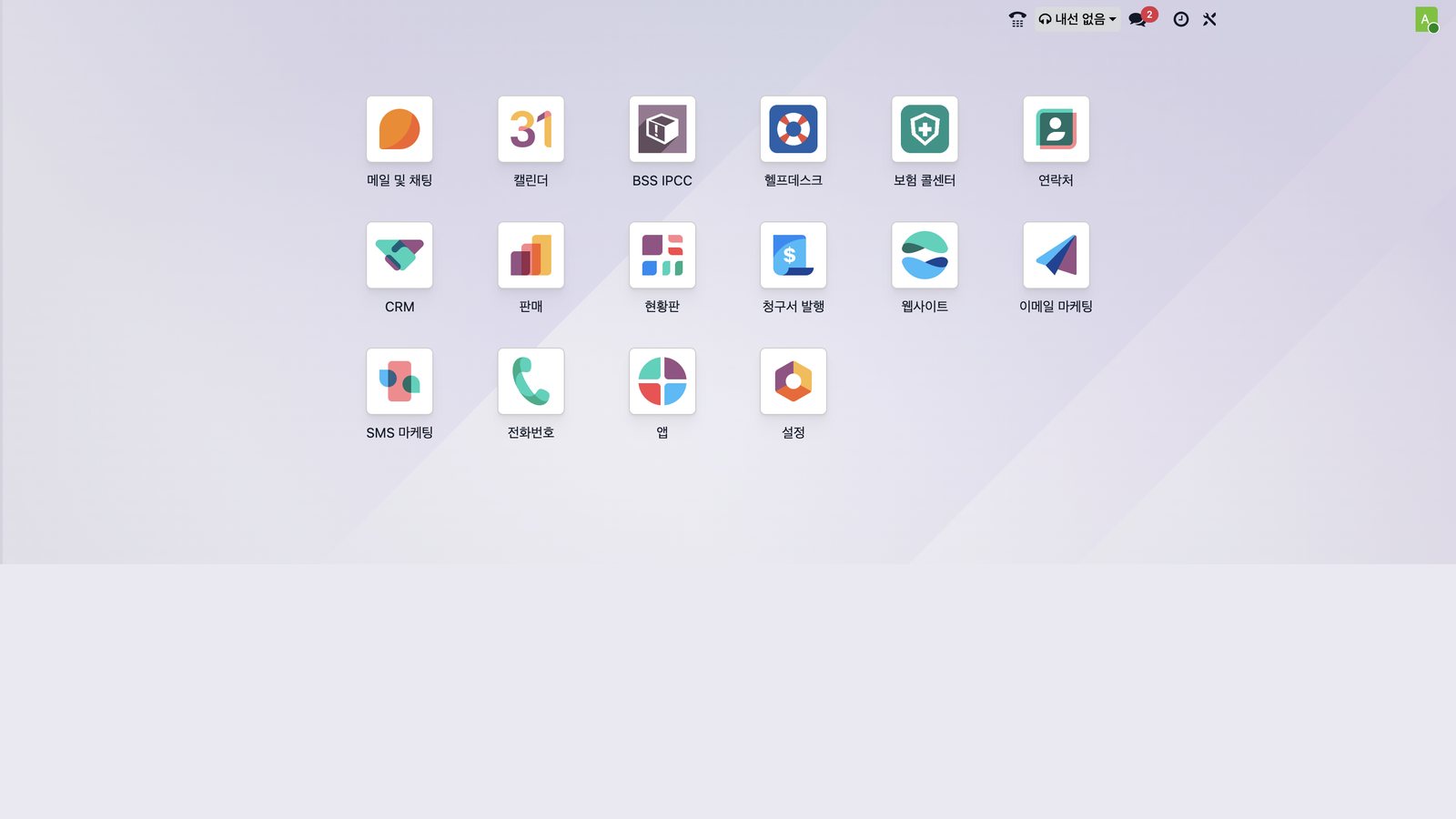
상담원 대시보드Agent dashboard상담원별 단말 로그인, 대기 ON/OFF, 소속 큐, 오늘 응답·상담 건수와 현재 통화 시간을 실시간으로 봅니다.Live view of device login, ready on/off, queues, today’s answered calls and current call time per agent.녹취 목록Recordings상담원 통화는 음성, AI 상담은 텍스트로 기록되고, 녹취마다 SHA-256 값으로 위·변조를 확인하며 QA 상태·점수를 관리합니다.Agent calls stored as audio, AI sessions as text; each recording carries a SHA-256 hash, with QA status and score.AI 상담 기록AI conversation log고객 발화(음성 인식)와 AI 답변이 말풍선으로 남고, 통화 ID·큐·길이·SHA-256이 함께 저장됩니다.Customer speech (STT) and AI answers kept as a chat log with call ID, queue, duration and SHA-256.통합 업무 화면One workspaceIPCC·CRM·헬프데스크·보험 콜센터가 하나의 Odoo에 있고, 상단 바에서 상담 상태와 전화기를 바로 사용합니다.IPCC, CRM, helpdesk and the contact-center app live in one Odoo; status and phone are always in the top bar.
이런 곳에 맞습니다Built for teams that…
- 보험·금융처럼 본인 확인 후 조회 응대가 많은 콜센터handle identity-verified inquiries — insurance, finance
- Odoo CRM·헬프데스크와 전화 상담을 한 화면에서 처리하고 싶은 조직want phone, CRM and helpdesk in one screen
- 반복 문의를 AI 상담으로 먼저 받고 싶은 고객센터want an AI agent to take repetitive questions first
- 상담원 장비 없이 재택·분산 근무로 운영하는 팀run remote or distributed agents without hardware
도입은 이렇게 진행합니다How rollout works
- 진단 — 대표번호·회선, 상담 유형, 큐 구성 확인Assess — numbers, trunks, inquiry types and queues
- 설계 — 인입 라우트·IVR·콜 배분 정책과 안내 멘트 설계Design — routes, IVR, routing policy and prompts
- 구축 — 서버 구성, SIP 트렁크 연동, 고객 데이터 API 연결Build — server, SIP trunk and customer-data APIs
- 오픈 — 상담원 교육, 녹취·QA·리포트 안정화Go-live — agent training, recording, QA and reports
우리 콜센터에 맞는 통화 흐름,
데모로 먼저 확인해 보세요See your call flow
in a live demo first
현재 대표번호·상담 유형·상담원 구성을 알려주시면, 맞춤 IVR과 콜 배분 시나리오로 데모를 보여드립니다.Share your numbers, inquiry types and team setup — we will demo a tailored IVR and routing scenario.