
전화를 받는 순간,
고객을 알고 응대합니다Know the customer
the moment you answer
상담원이 고객을 찾느라 통화 첫 30초를 쓰고 있나요? BSS IPCC는 교환기·IVR·녹취·AI 상담을 Odoo CRM 안에 담아, 연결과 동시에 고객정보를 열고 통화 후 메모까지 AI가 씁니다.Are agents spending the first 30 seconds of every call looking up the customer? BSS IPCC puts the PBX, IVR, recording and AI agent inside Odoo CRM — the record opens on connect and AI writes the note afterwards.
콜센터에서 매일 반복되는 네 가지 문제Four problems contact centers repeat daily
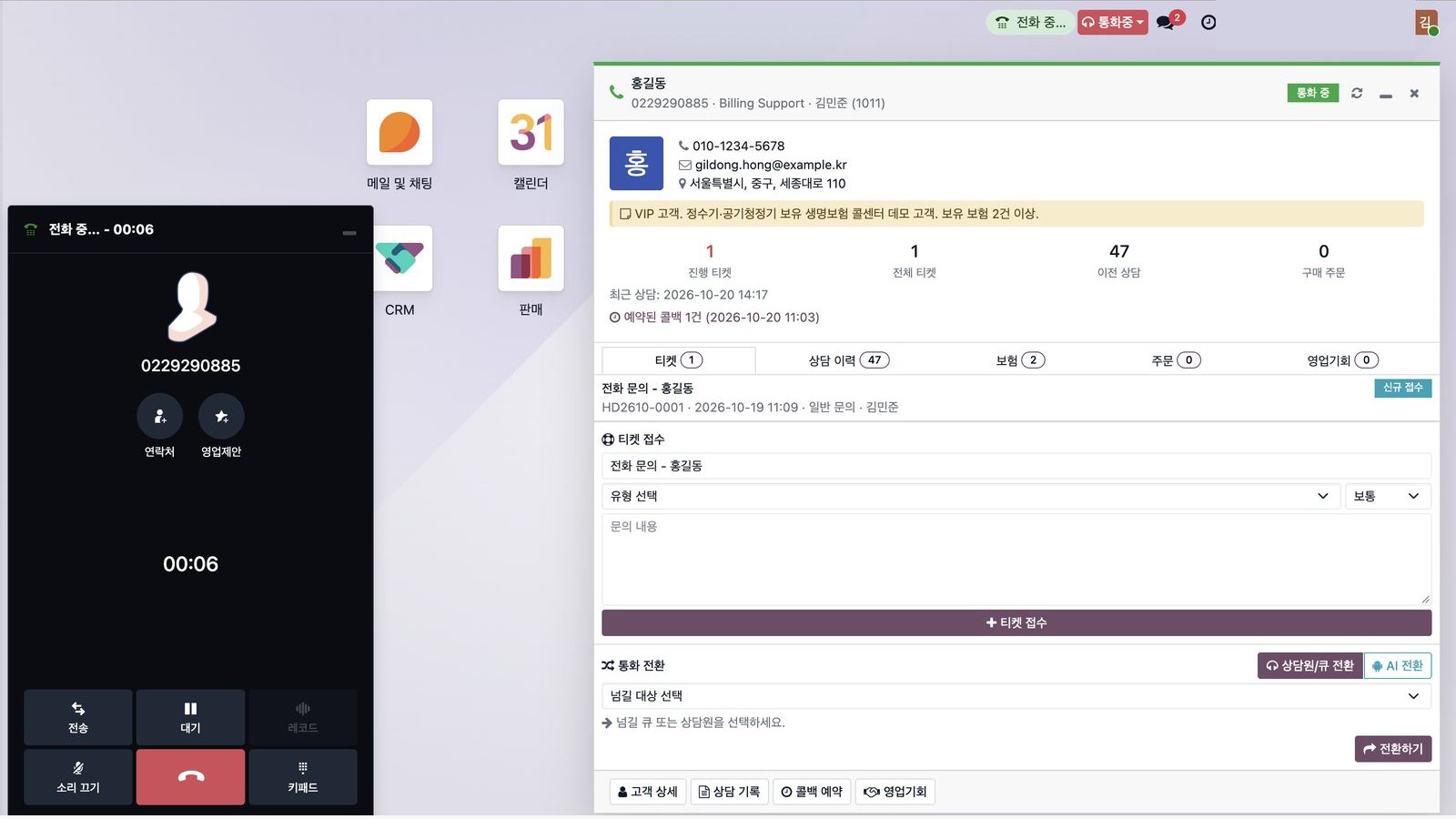
IVR에서 먼저 고객을 확인하고, 연결되는 순간 상담원 화면에 고객정보가 열립니다.The IVR verifies first, and the record opens on the agent’s screen as the call connects.
보유 계약·납입 금액·납부일 같은 조회는 IVR과 AI 상담이 먼저 처리합니다.Contract, amount-due and due-date lookups are handled by the IVR and AI agent first.
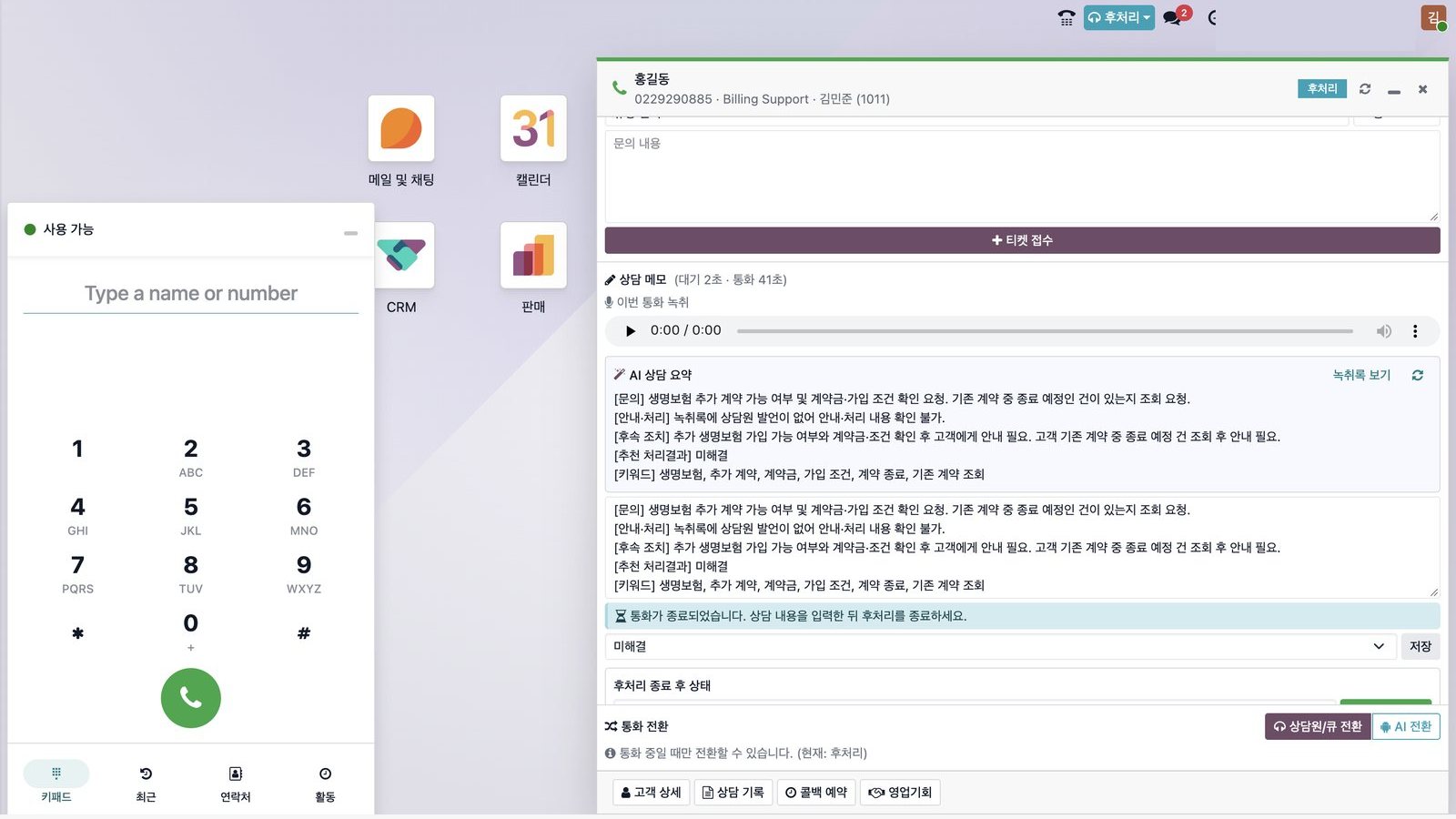
AI가 통화 내용을 요약해 상담 메모 초안을 쓰고 처리 결과를 추천합니다.AI drafts the note from the call and suggests the outcome.
녹취·AI 대화 기록·상담 이력·티켓이 Odoo CRM의 고객 한 명 아래 모입니다.Recordings, AI transcripts, history and tickets live under one customer in Odoo CRM.
서버 한 대, 브라우저 하나로 시작Start with one server and a browser
BSS IPCC
교환기·IVR·콜 배분·녹취·AI 상담. 상담원은 웹 브라우저로 전화를 받습니다.PBX, IVR, routing, recording and AI agent. Agents answer in the browser.
자세히 보기Learn moreOdoo CRM · 헬프데스크Helpdesk
고객·계약·티켓·영업기회를 상담 화면과 같은 곳에서 관리합니다.Customers, contracts, tickets and opportunities in the same place as the call.
자세히 보기Learn moreAI 상담 · 메모AI agent & notes
음성 인식 → AI 답변 → 음성 합성으로 반복 문의를 먼저 받고, 통화 후 메모를 자동으로 씁니다.Speech-to-text → AI answer → text-to-speech for repetitive questions, plus automatic call notes.
실제 화면으로 확인하세요See the real screens
 클릭해서 크게 보기Click to enlarge ⤢
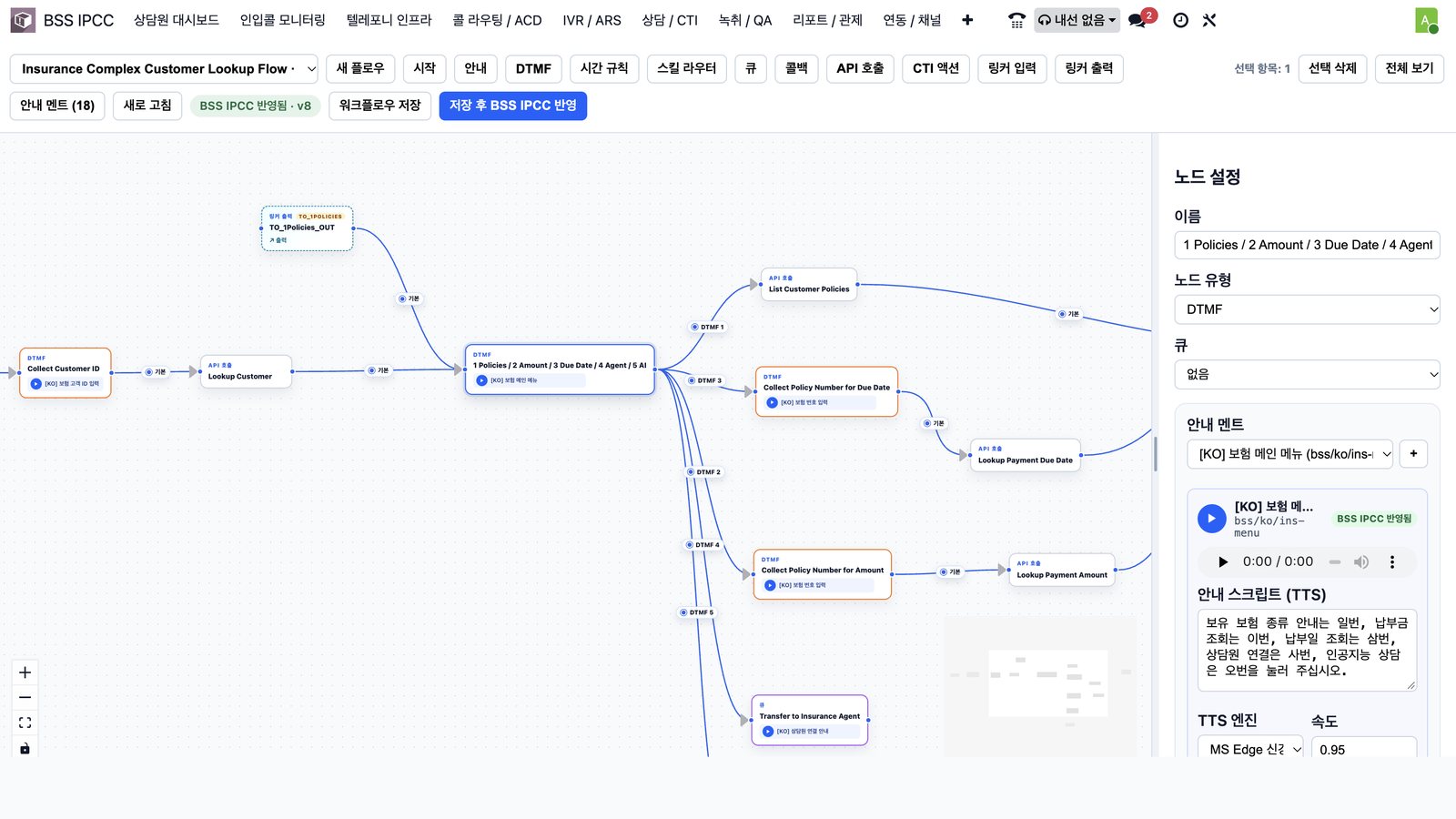
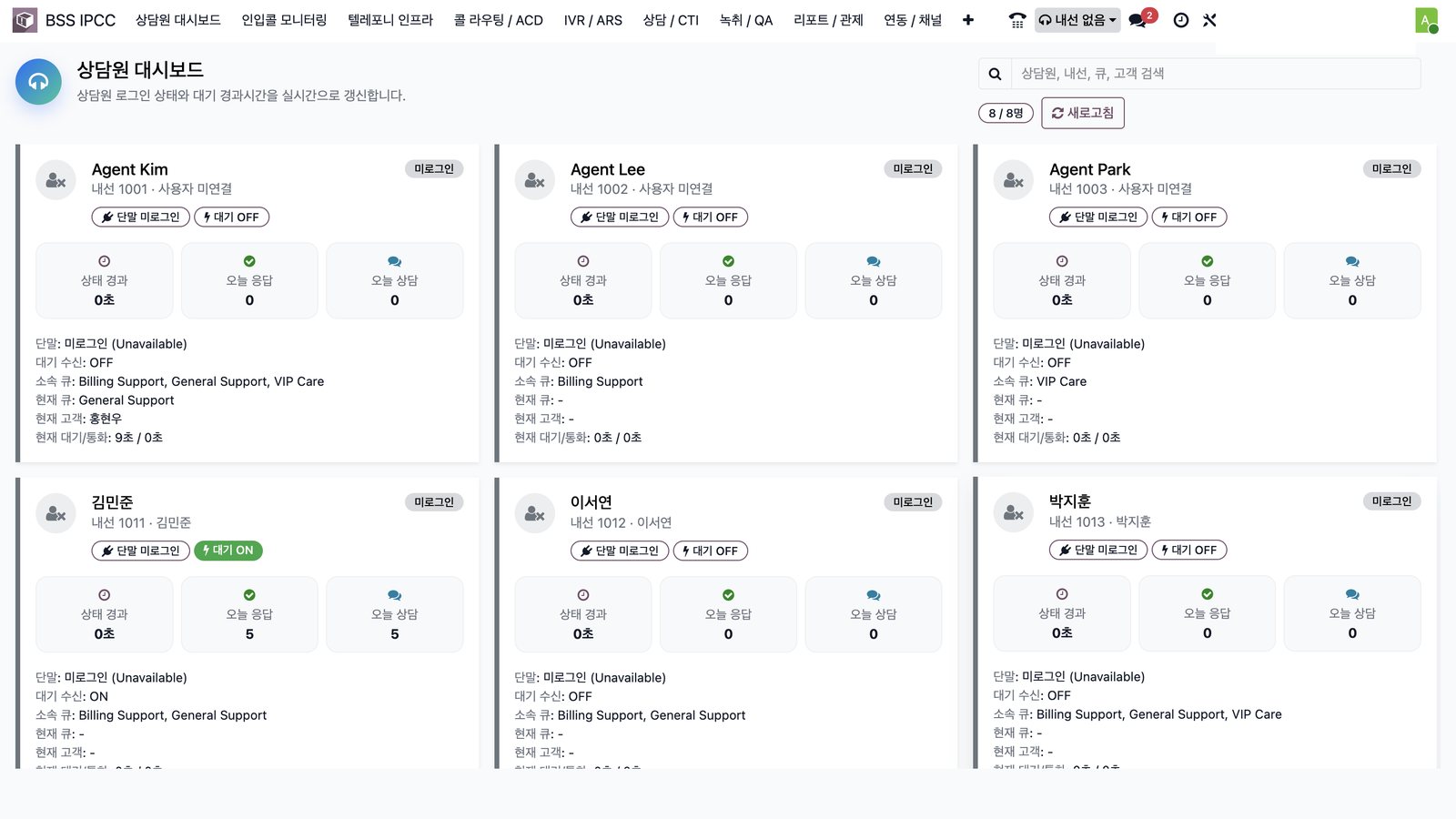
통화 중 고객정보Customer popup in call전화가 연결되는 순간 고객정보·VIP 메모·보유 계약·상담 이력이 열립니다.Customer data, VIP notes, contracts and history open the moment the call connects.AI 상담 메모AI call summary통화가 끝나면 AI가 문의·안내·후속 조치를 요약해 상담 메모 초안을 씁니다.After the call, AI drafts the note — inquiry, answer, follow-up.IVR 디자이너IVR designer고객 확인·조회 메뉴·상담원 연결·AI 상담을 화면에서 그려서 바로 반영합니다.Draw verification, self-service, agent and AI paths and publish instantly.상담원 관제Agent monitoring상담원별 대기 상태·소속 큐·오늘 응답 건수를 실시간으로 봅니다.Live status, queues and today’s calls per agent.
보험 콜센터 시나리오로 구현해 두었습니다Built and running as an insurance scenario
본인 확인 후 조회 문의가 대부분Most calls are verified lookups
계약·납입 금액·납부일 문의가 상담원 업무의 큰 비중을 차지하는 보험 콜센터.An insurance contact center where contract, amount and due-date questions dominate agent time.
- 녹취 고지 → 고객번호 입력 → 고객 데이터 조회Recording notice → customer ID → data lookup
- 조회 메뉴 3종 + 상담원 연결 + AI 상담3 self-service menus + agent + AI agent
- 상담원 연결 시 고객정보 팝업, 통화 후 AI 메모Customer popup on connect, AI note after the call
실제 전화로 시연합니다We demo it with a real call
30분 데모에서 대표번호로 직접 전화를 걸어 전체 흐름을 보여 드립니다.In a 30-minute demo we call the number live and walk through the whole flow.
데모 운영 중Demo liveIVR 흐름 설계 상담An IVR flow design session
- 1지금 들어오는 문의 유형과 상담원 구성을 함께 정리합니다.We map your current inquiry types and team setup together.
- 2IVR에서 먼저 처리할 조회와 상담원·AI로 보낼 문의를 나눕니다.We split what the IVR should handle from what goes to agents or AI.
- 3메뉴 구조·콜 배분 규칙·안내 멘트 초안을 그림으로 드립니다.You get a drawn menu structure, routing rules and draft prompts.
IVR 흐름 설계 상담IVR design session
비용 없이, 우리 콜센터에 맞는 통화 흐름을 먼저 그려 드립니다.No cost — we draw the call flow that fits your team first.
지금 신청하기Request now 먼저 30분 데모부터 보고 싶어요I’d rather see a 30-min demo first →우리 콜센터에 맞는 통화 흐름,
데모로 먼저 확인해 보세요See your call flow
in a live demo first
30분 라이브 데모로 실제 화면을 먼저 보세요. 현재 업무 흐름을 듣고 적용 가능한 범위와 다음 단계를 제안해 드립니다.See the real screens in a 30-minute live demo. We listen to how you work and propose a practical scope and next step.